Showing posts with label Softwares. Show all posts

Sep 14, 2012

Great tool :course-builder from google


It is a great step from Google which will support education.

As Google said : Course Builder is our experimental first step in the world of online education. It packages the software and technology we used to build our Power Searching with Google online course. We hope you will use it to create your own online courses, whether they're for 10 students or 100,000 students. You might want to create anything from an entire high school or university offering to a short how-to course on your favorite topic.

Course Builder contains software and instructions for presenting your course material, which can include lessons, student activities, and assessments. It also contains instructions for using other Google products to create a course community and to evaluate the effectiveness of your course. To use Course Builder, you should have some technical skills at the level of a web master. In particular, you should have some familiarity with HTML and JavaScript.


Join Peter Norvig and special guests for two Hangouts on Air. Peter will answer your questions about MOOC design and the technical aspects of using Course Builder.
•19 Sept 10:00am - 10:45am PDT
•26 Sept 10:00am - 10:45am PDT

http://code.google.com/p/course-builder/

and this is the group for the course-builder :
http://groups.google.com/forum/?fromgroups#!forum/course-builder-forum

Thanks google.

Aug 21, 2012

Adobe Edge 7 is Here


Preview 7 is here. New features include resizable layouts, rulers and guides, a more precise timeline, and much more.

Motion and Interaction Design for HTML5

Adobe® Edge Animate is a powerful, intuitive tool for creating stunning animated and interactive content using HTML5, CSS3 and JavaScript. Edge Animate is intuitive and has powerful features that can save time and headaches. Content made with Edge Animate runs gracefully on mobile devices and desktops, expanding your reach on the modern web.


Edge Animate Highlights:

Intuitive user interface — The features of Edge Animate are centered around a WebKit-based stage, so your compositions have fidelity across modern browsers. Design engaging HTML content with an assortment of styling options and integration with font services like TypeKit.

Animate with precision — Add motion to graphics and HTML elements with amazing accuracy with Edge Animate using the powerful, yet easy-to-use, timeline editor. Edit property-based keyframes and enhanced easing for complete animation control, or leverage the Pin tool to speed up the animation process.

Energize existing HTML — Since Edge Animate works natively with HTML, you can open HTML pages and add motion to them. The animation code generated by Edge Animate is stored in a separate file, so the integrity of the page is preserved.

Extend — Enhance the richness of your work with Edge Animate by handling user interaction and playback control. Use the built-in code snippet library or add your own JavaScript code.

Symbols — Create nested animations with independent timelines and interactive capabilities. Symbols are reusable and can be controlled via exposed APIs and pre-built code snippets.

Mobile-ready content — Content created with Edge Animate is designed to work reliably on iOS and Android devices, and modern desktop browsers such as Firefox, Chrome, Safari, and Internet Explorer 9. Edge Animate also lets you define a fallback state for older browsers.

Aug 20, 2012

RoboMind is a simple educational programming environment


RoboMind is a simple educational programming environment which introduces the fundamentals of programming to students in a simple and attractive way. While programming a virtual robot, the student learns about modern programming techniques and computer science in general. As the student solves specific problems he or she also gains insight into areas such as robotics and artificial intelligence.

RoboMind can be used for science and technology projects at primary schools, secondary schools and further education. It is also very suitable for learning about problem solving and logical thinking. Topics often not covered very well in educational programs. Another possibility of RoboMind is to show how theoretical aspects from logic and computer science can be used to solve practical problems in science and industry. As such it is an excellent tool for schools that want to be outstanding in technology education.

Some nice features and advantages of RoboMind are:

Start right away
Free for personal use
Learning by discovery with online docs
Technology introduction for everyone
Complete lesson packs available
LEGO Mindstorms NXT support

RoboMind is a simple educational programming environment which introduces the fundamentals of programming to students in a simple and attractive way. While programming a virtual robot, the student learns about modern programming techniques and computer science in general. As the student solves specific problems he or she also gains insight into areas such as robotics and artificial intelligence.

The software site:

Aug 17, 2012

Get Connected with VidyoWay


VidyoWay is the first free business-to-business interconnectivity service that delivers high-quality video conferencing for multi-party or point-to-point meetings for legacy devices.

Simple As easy to setup as an audio call.
Unleash your video conferencing systems and join the community.
Free yourself from network, location, or device constraints.

VidyoWay Offers
Enables seamless interconnectivity of Cisco, Polycom, Lifesize, and other legacy H.323 and SIP-based endpoints

Supports Microsoft Lync and voice only devices

Provides free mobile client for users without access to legacy VC or MS Lync

Aug 10, 2012

Articulate Storyline Update 1

Localize content, track learners on iPads, and more

New in Storyline Update 1

Easily translate and localize your courses.
Export all text in your course to Microsoft Word or XML format. Storyline preserves all formatting when you import text back in.
Track and manage learners using iPads.
Use any learning management system (LMS) that supports Tin Can, including Articulate Online, to track and manage learners who are using the Articulate Mobile Player app on iPad to view courses.
Add triggers to the previous button.
Now you can add triggers to both the previous and next buttons to customize navigation, feedback, and more.
Add glossary and notes tabs to your HTML5 output.
HTML5 output also supports JavaScript triggers and custom player text labels.

Jul 1, 2012

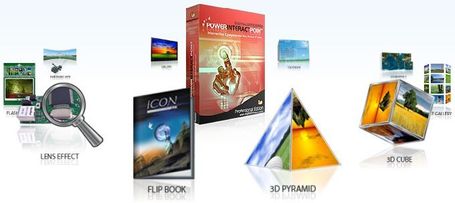
PowerInteractPoint : Interactive Flash Objects


With PowerInteractPoint now you can create rich interactive content in Flash format.
PowerInteractPoint is a powerful multimedia software that lets you create rich interactive web content, e-learning content or easily embed the interactivity in your PowerPoint presentation. Each interactivity effect is unique, visually stunning and can be easily created without any programming knowledge. The output file is in Adobe Flash format and can seamlessly be integrated to any e-learning course, PowerPoint file or even on any Web site.
PowerInteractPoint is a rapid, customizable and easy to use E-Learning tool. It is like a non specialist development tool which helps to create variety of e-learning interactivities like ebook, 3D Cube, Calender, Panoramic Zoom effects and much more that are flexible and beyond our imaginations. This helps to achieve outstanding results without any coding or programming thereby saving on huge investments in time, money and programming expertise. It helps you communicate your ideas powerfully.

Jun 29, 2012

PowerQuizPoint: PowerPoint Quiz Creator


It is now easy to create Macromedia Flash Quizzes from within PowerPoint. With PowerQuizPoint Quiz Creator you can insert interactive Quiz slides directly into your PowerPoint presentations and Publish them to Macromedia Flash format.
With PowerQuizPoint PowerPoint to Quiz Publisher, corporate trainers and teaching professionals or anyone who wants to easily create Quizzes can now create rich-media interactive Quiz in Flash format for online training.

PowerQuizPoint Quiz Maker is a revolutionary PowerPoint quiz maker which is based on the world leading PowerPoint to Flash engine PowerFlashPoint.
PowerQuizPoint Quiz Creator is a convergence of power of features in PowerPoint and Macromedia Flash. Flash Quizzes created with PowerQuizPoint Quiz Maker is web ready and can be uploaded to our online PowerPoint and e-Learning sharing portal SlideServe.com. Get free trial version and discover just how easy it is to use!

ZenlerStudio: PPT to Flash Converter for Creating eLearning Courses


With Zenler Studio now you can create interactive SCORM/AICC compliant Flash Based e-Learning courses from right within PowerPoint. Courses created are ready to be published to any Learning Management System (LMS) including Zenler Online LMS. You can also design or edit your Zenler courses even when you are offline and not connected to the internet.
Leverage PowerPoint - the most popular and powerful editing environment available. No more expensive Flash eLearning content creation. So Easy You'll Be Shocked! Zenler Studio brings unprecedented power to trainers to create engaging eLearning experiences.
Zenler Studio comes with a Course Designer that sits right within PowerPoint and lets anyone create courses with great ease. Select readily available stunning course styles to base your courses on or design your own. Engage your trainees like never before.

A revolutionary approach to creating Flash Quizzes. Apply Quizzes directly into PowerPoint and publish the Quiz to Flash. Select from a range of amazing Quiz styles. Quizzes can then be published to web ready Flash. With just a few clicks you can add your questions, select questions to your question bank, add them to your course. Track the results online on any SCORM compliant LMS

Easy to use Screen Recording allows you to capture your screen video and create quick demos and insert them directly into PowerPoint. The videos will be streamed using Flash once you publish the course including Videos. You can also insert videos or YouTube videos directly into your eLearning Courses..

http://www.digitalofficepro.com/powerpoint/elearning-authoring-tool.html

PowerFlashPoint : PowerPoint to Flash Converter


PowerFlashPoint is a PowerPoint® plug-in that automatically converts your PowerPoint XP/2002, 2003, 2007 & 2010 presentations into a highly compressed Internet-ready presentation in the Macromedia Flash™ format.
With PowerFlashPoint PowerPoint to Flash Publisher, you can easily create rich-media Flash presentations and interactive online training. Upload PowerPoint presentations using PowerFlashPoint FREE to share online securely on SlideServe . Get free trial version and discover just how easy it is to use!
You can see many samples on the site:

Jun 16, 2012

Adobe Release Captivate 6 With HTML 5 support


Adobe® Captivate® 6 software helps you rapidly author a wide range of interactive eLearning and HTML5-based mLearning content. Easily create product demos in HD, application simulations, and soft skills and compliance training. Import Microsoft® PowerPoint slides and enrich with multimedia, interactive elements and quizzes. Deliver content to virtually any device, including iPads.
Easily create show-me product demos in HD, interactive let-me-try application simulations, and test-me assessments. Publish projects to the web, desktops, YouTube®, and leading SCORM- and AICC-compliant LMSs. Deliver HTML5-based content to mobile devices.

Transform Microsoft® PowerPoint presentations into interactive eLearning content. Make courses come alive with actors, themes, and interactive elements. Include eye-catching quizzes, add branching scenarios, and publish to desktops, mobile devices, and LMSs.

Create interactive eLearning content and publish it on mobile devices, including iPads, using HTML5. Send scoring data to leading SCORM- and AICC-compliant LMSs and track learner progress.

Deliver eLearning on the go. Now publish eLearning content as HTML5, and take your courses to mobile devices. Send scoring data to leading SCORM- and AICC-compliant LMSs and track learner progress.

Easily create high-quality product demos with the new capture-as-a-video workflow. Edit video, and add transitions, smart shapes, audio, and captions. Insert a talking head or another video in a picture-in-picture format. Publish it to YouTube with a single click.

Insert aesthetically designed interactive elements to eLearning content with just a click. Simply select from a wide range of stunning out-of-the-box interactions like Process Cycle, Glossary, Accordion, Pyramid, Animated Rollover, and more, customize the content and appearance, and you’re done.

Rest assured that your scoring data will integrate smoothly with your Learning Management System (LMS). Publish your courses effortlessly to leading LMSs like Moodle, Blackboard, Plateau, Saba, and SumTotal.

Jun 7, 2012

What new in ToolBook 11


As a busy professional, you require a fast and easy solution for creating learning content. ToolBook, the SumTotal solution for creating interactive content, quizzes, assessments, and software simulations, has now been enhanced for even greater ease in creating rich, interactive, and mobile content quickly
New feature highlights found in ToolBook 11 include:

Simpler, more functional startup dialog
The Startup Dialog has been redesigned to have a more modern look, which also provides for a better process flow for a user trying to start a new book. The Help Resources section has been filled with over a dozen helpful resources to assist you in using ToolBook

Question Wizard
A new catalog object labeled "Question Wizard" has been added to the catalog within the Questions category. When added to your page, this new object will step you through options available for configuring one of the following four question types: Multiple Choice, True/False, Fill in the Blank and Match Item. These four represent the most commonly used question types.

Additional SmartStyles
SmartStyles is a feature that makes it easy to apply a consistent look and style to pages and objects in a book. ToolBook 11 introduces 39 additional SmartStyles including 16 which are specifically designed for mobile device delivery.

Arrows (Clipart) Catalog Category
A new catalog category has been added to ToolBook 11 which provides access to 192 different graphical arrows. These are PNG images with full alpha channel support, which means they will perfectly overlay any other page elements used and are resizable as well.

Google Chrome 5
The Publish to Web feature of ToolBook has been enhanced to now offer support for Chrome 5+ browsers

BlackBerry 6+
The Publish to Web feature of ToolBook has been enhanced to now offer support for BlackBerry 6+ mobile devices.

Randomization Enhancements
The ability to randomize the order of questions displayed to a user has existed in ToolBook for some time as a feature that you can turn on using the Behavior tab of the Properties for Lesson dialog. ToolBook 11 introduces two new features to this dialog, an option to Validate if the book is properly set up for randomization, and a Configure option to allow you exclude certain pages from the randomization

Delete Unused Resources
This new feature will delete from your book, resources that are no longer actively being used by any objects within your book.

Export All Text
This utility will create a text file containing all of the text found within the book. This is useful when a third party will need to proofread or grammar check the contents of your lesson.
Add Feature to Delete Unused Extensions
This new will delete from your book, Extensions that are no longer actively being used.

Move a Range of Pages
The Book Explorer will allow you to reorder your pages by permitting you to drag a page to a new position within the Book Explorer. However this only works for a single page at a time. For ToolBook 11, the ability to move a range of pages has been added.

Reassign a Range of Pages
The Book Explorer will allow you to reassign which background is used by a given page by dragging the page onto another background, as listed in the Book Explorer. However this only works for a single page at a time. For ToolBook 11, the ability to move a range of pages has to another background has been added.

Enhanced Draw Objects
Draw objects (lines, polygons, rectangles, etc.) have been enhanced to now render with antiAliasing. This effect provides for a much cleaner edge to the draw object. Additionally, transparency of Draw Objects have been updated to blend transparent colors more realistically. Lastly, transparent Draw Objects are now fully supported in a DHTML Exported lesson, whereas in previous version the transparency effect would be lost when viewed in a browser.


May 26, 2012

Articulate Studio 12


Articulate Studio ’12 products share a single unified player, so learners navigate with one set of controls—even when courses include Articulate Quizmaker assessments and Articulate Engage interactions. The unified player also lets you list slide titles, quiz questions, and interaction steps on a single, consolidated menu.

Add illustrated and photographic characters to your courses, quizzes, and interactive e-learning content. Articulate Studio ’12 includes a character library with thousands of combinations of characters, expressions, and poses. Purchase additional Articulate character packs to extend your character library even more

Publish e-learning content to multiple formats so learners can interact with it on iPads, desktops, laptops, Android devices, and more. Articulate Studio ’12 products publish to Flash and to Articulate Mobile Player—a native iOS application that optimizes content for the iPad. Studio ’12 products also publish to HTML5, an increasingly popular format for rich multimedia content.

Localize your content with the right-to-left language support in Articulate Studio ’12. It also supports double-byte character sets (DBCS), so you can even translate your content into Chinese, Japanese, and Korean.

and more features.
It is Comming Soon

May 20, 2012

Nearpod is solution for the synchronized use of iPads in the classroom


An all-in-one solution for the synchronized use of iPads in the classroom.
Create, Engage and Assess
With Nearpod it’s easy, really easy.
Bring the classroom to life with interactive mobile
presentations that teachers create and
customize themselves.
And it’s free.

http://www.nearpod.com/

May 19, 2012

GoClass a powerful new mobile tool


A powerful new tool for innovative teaching and inspired learning.
GoClass is a teaching application for tablet devices that redefines the boundaries of computing in the classroom. Connect with your students like never before, customize and fine-tune your lesson plans on the fly, engage students in new ways and continuously evaluate their understanding while you are in class.

GoClass is a powerful tool that allows an instructor to build, edit and manage class sessions. Like for any classroom, the instructor can use resources such as text, notes, media, questions and research tools to build organized and timed lesson plans. It allows you to annotate on images or draw diagrams, share materials and ask questions in the lesson plans with students during class. Furthermore, the app captures results data for formative assessments conducted in class for after-class review.

GoClass creates a unique opportunity for students to follow a class at their own pace. Students can study materials shared by the instructor, and interact with text and images using touch interactions such as pinch, zoom, pan, etc. You can use this app to answer in-class questions and review the complete lesson along with logs of your responses after class.

May 3, 2012

Articulate Storyline is here

Storyline is a powerful standalone tool with unparalleled interactivity features that will help you build dynamic, engaging content—including simulations, screen recordings, drag-and-drop interactions, click-and-reveal activities, quizzes and assessments, and much more

Getting Started with Articulate Storyline

 Features

Showcases

You can puplish to HTML5, Flash, and Mobile Devices
It is a great tool

Mar 6, 2012

Raptivity 7 is Here

Raptivity® allows you to quickly and easily create learning interactions such as games, simulations, brainteasers, interactive diagrams, virtual worlds and more. You can embed these interactions right into your online courses to improve learner engagement.

Quickly and easily create learning interactions with Raptivity. Choose from over 170+ learning interactivity templates and add games, simulations, brainteasers, interactive diagrams, virtual worlds and more to your course within minutes.
  • Publish Flash and HTML5 based interactions in a single click
  • Learning interactions that go into multiple devices, including mobile phones that support Flash - Android, BlackBerry and others
  • Great user interface to completely customize all interactions without writing a single line of code
  • Pre-built library of learning interactions based on best practices in instructional design
  • Fully compliant with SCORM and AICC to track and integrate with all leading learning management systems.


Oct 13, 2011

Adobe Captivate Widget: Dynamic PDF Export


Create certificates, transcripts, guides and job aids with the Learner’s custom information.  Add a company logo, watermark, or a high-resolution certificate image to make your custom certificates.  Dynamically export Quiz, System, and User variables tailoring the content to your exact needs.  When the button is pressed, the Learner is prompted to save the PDF to their computer.  This widget was made with the awesome CpGears Framework and the AlivePDFlibrary.


More information :

Raptivity releases HTML5 Starter Pack with v6.6‏


Raptivity releases HTML5 Starter Pack with v6.6‏

The HTML5 starter pack contains various interaction models to create  interactions for various eLearning stages. These interactions have been  designed to create interactive learning which can be seamlessly used in both eLearning and mLearning environments. It publishes the output in SWF as well as HTML5 formats.

More Information :

Sep 22, 2011

HTML5 Converter for Adobe Captivate 5.5


It is a great new tool .
The HTML5 Converter for Adobe® Captivate® 5.5 is an experimental technology that converts SWFs generated by Adobe Captivate 5.5 into HTML5 format. Reuse and extend the reach of your content to devices that do not support the Adobe Flash® runtimes.


More information and examples :


Aug 9, 2011

authorstream To share PowerPoint presentations on the web


The best way to share PowerPoint presentations on the web
authorSTREAM retains your animations, audio narrations and in-slide videosShare presentations publicly or privately, for freeConvert your presentations to videoBroadcast your presentations live, in real time